我的第一个 OpenClaw Skill:给电视调试做个 tv-adb
OpenClaw 部署踩坑记录:从装起来到跑通
Headscale Migration from CentOS 7 to Ubuntu 24
This guide covers the process of migrating a Headscale setup from a CentOS 7 system to Ubuntu 24, including steps for exporting configurations, database, and Docker images, as well as importing them on the new system.
1. Export Data and Image on CentOS 7
Export Configuration and Database
To begin, export the configuration and database files from the headscale container:
docker cp headscale:/etc/headscale/config.yaml ./config.yaml
docker cp headscale:/etc/headscale/db.sqlite ./db.sqlite
Export Docker Image
Use docker save to export the headscale Docker image:
docker save -o headscale_image_backup.tar headscale/headscale:0.23.0-beta1
2. Transfer Files to Ubuntu 24
Transfer the configuration, database, and image files to the Ubuntu 24 system using scp, rsync, or another file transfer tool:
scp config.yaml db.sqlite headscale_image_backup.tar user@ubuntu-server:/path/to/backup/
3. Import Data on Ubuntu 24
Load Docker Image
On the Ubuntu system, use docker load to import the Docker image:
docker load -i /path/to/backup/headscale_image_backup.tar
Create Headscale Container
Move the configuration and database files to /etc/headscale/ and create the container:
Common Docker Issues Solutions
Docker 疑难杂症汇总
在使用 Docker 的过程中,可能会遇到各种各样的问题,尤其是在国内环境下,网络限制可能会导致一些操作困难。本文将汇总常见的 Docker 安装与使用过程中可能遇到的疑难杂症,并提供相应的解决方案。
1. Docker 安装过程中网络问题
问题描述:
在国内使用 apt-get 安装 Docker 时,经常遇到无法连接到 Docker 官方仓库 download.docker.com 的问题,导致无法获取或更新 Docker 包。
解决方案:
-
使用国内镜像源: 通过修改 Docker 的 APT 源配置文件,切换到国内镜像源(如清华大学、阿里云、中科大等),可以有效解决网络连接问题。
Resolving Verdaccio Permissions and Proxy Issues in Docker
Resolving Verdaccio Permissions and Proxy Issues in Docker
问题 1:无法在 Docker 容器中创建目录
问题描述:
在构建 Verdaccio 的 Docker 镜像时,尝试创建 /usr/rn-plugin/storage 和 /usr/rn-plugin/plugins 目录时,出现了权限不足的错误。
解决方案:
通过在 Dockerfile 中切换到 root 用户来创建目录,并设置适当的权限。然后切换回 verdaccio 用户
# verdaccio.Dockerfile

FROM harbor.example.com/cc_iot/verdaccio:latest

# 设置 Verdaccio 配置
COPY ./verdaccio/config.yaml /verdaccio/conf/config.yaml
COPY ./verdaccio/htpasswd /usr/rn-plugin/htpasswd

# 创建存储和插件目录并设置权限
USER root
RUN mkdir -p /usr/rn-plugin/storage /usr/rn-plugin/plugins && \
    chown -R 10001:10001 /usr/rn-plugin/storage /usr/rn-plugin/plugins && \
    chown 10001:10001 /usr/rn-plugin/htpasswd
USER verdaccio

# 设置存储和插件目录为卷
VOLUME ["/usr/rn-plugin/storage", "/usr/rn-plugin/plugins"]

# 暴露 Verdaccio 端口
EXPOSE 4873

# 设置 Verdaccio 环境变量
ENV VERDACCIO_APPDIR /verdaccio
ENV VERDACCIO_USER verdaccio
ENV VERDACCIO_PORT 4873
ENV VERDACCIO_PROTOCOL http
ENV VERDACCIO_STORAGE /usr/rn-plugin/storage
ENV VERDACCIO_PLUGINS /usr/rn-plugin/plugins
ENV VERDACCIO_LOG_FORMAT pretty
ENV VERDACCIO_LOG_LEVEL trace
ENV VERDACCIO_PUBLIC_URL https://www.example.com/verdaccio

ENTRYPOINT ["/usr/local/bin/verdaccio", "--config", "/verdaccio/conf/config.yaml", "--listen", "0.0.0.0:4873"]
问题 2:本地宿主机目录权限不足
问题描述:
在容器中无法写入挂载的本地目录 /root/dd/storage 和 /root/dd/plugins。
Server setup process using Headscale with Docker.
Server setup process using Headscale with Docker.
记录采用headscale & docker 异地组网过程
需求背景
曾经我尝试使用
ZeroTier,最初的体验非常不错。然而,随着时间的推移,我发现连接速度变得缓慢和卡顿, 有时甚至需要借助特殊的网络加速技术来提高性能。后来,在X社区中,我看到有人分享了Tailscale的好评, 这促使我安装了Tailscale的官方客户端。相较于ZeroTier,Tailscale在速度上有显著的提升, 尽管偶尔也会遇到一些延迟。Tailscale依赖于其官方服务器,但它支持用户自建服务器, 这一点非常吸引我。通过结合使用Tailscale客户端和官网,我们可以实现异地组网。 为了达到更理想的连接速度,我决定自建异地组网系统。这样不仅能控制家中的群晖设备,还能优化PT下载等功能。
Record an Error During Node RED Deployment
记一次在docker 打包部署node red 启动报错
报错如下:
---------------------------------------------------------------------
Your flow credentials file is encrypted using a system-generated key.

If the system-generated key is lost for any reason, your credentials
file will not be recoverable, you will have to delete it and re-enter
your credentials.

You should set your own key using the 'credentialSecret' option in
your settings file. Node-RED will then re-encrypt your credentials
file using your chosen key the next time you deploy a change.
---------------------------------------------------------------------

22 Feb 20:47:25 - [warn] Encrypted credentials not found
22 Feb 20:47:25 - [info] Server now running at http://127.0.0.1:3002/
22 Feb 20:47:25 - [info] Starting flows
22 Feb 20:47:25 - [info] Started flows

22 Feb 20:47:35 - [warn] Flushing file /data/nodes to disk failed : Error: EISDIR: illegal operation on a directory, rename '/data/nodes.$$$' -> '/data/nodes'
22 Feb 20:47:35 - [warn] Error saving flows: EISDIR: illegal operation on a directory, rename '/data/nodes.$$$' -> '/data/nodes'
22 Feb 20:47:35 - [warn] Error: EISDIR: illegal operation on a directory, rename '/data/nodes.$$$' -> '/data/nodes'
PM2启动信息
使用如下PM2配置文件启动Node-RED实例:
Remember the Problem of Apisix and Node Red Multi Instance Debugging
Resolving Docker Compose and ApiSix Port 502 Error
在工作中,我尝试部署Saas应用程序,使用了Docker Compose、ApiSix和Node-RED。 然而,在这个过程中,我遇到了一个502端口访问错误。 我花了一整天的时间来解决这个问题,最终找到了问题的原因。
问题出在我创建Node-RED实例并在ApiSix中添加upstream时。 我注意到,当我运行以下命令来创建Node-RED实例时,我不小心将端口号设置为1881来进行暴露:
Resolving the Issue of Centos 7 Vm Unable to Ping Its Host Machine
解决因docker网络导致的网络问题,无法ping通局域网ip
背景
在我的办公室网络环境中,我有一个 Windows 10 宿主机,上面安装了 VMware,并在 VMware 中运行了一个 CentOS 7 虚拟机。虽然宿主机和 CentOS 7 虚拟机都可以正常上网并 ping 通外部地址,但 CentOS 7 无法 ping 通宿主机。这让我非常困惑,并最初怀疑可能是公司的网管对我的 MAC 地址进行了某种限制。
[root@localhost ~]# route -n
Kernel IP routing table
Destination     Gateway         Genmask         Flags Metric Ref    Use Iface
0.0.0.0         172.22.128.1    0.0.0.0         UG    100    0        0 ens33
172.17.0.0      0.0.0.0         255.255.0.0     U     0      0        0 docker0
172.18.0.0      0.0.0.0         255.255.0.0     U     0      0        0 br-6b8659f8f886
172.19.0.0      0.0.0.0         255.255.0.0     U     0      0        0 br-89bc77a42b8a
172.20.0.0      0.0.0.0         255.255.0.0     U     0      0        0 br-b4e656893ece
172.22.128.0    0.0.0.0         255.255.240.0   U     100    0        0 ens33
172.26.0.0      0.0.0.0         255.255.0.0     U     0      0        0 br-5b7ab2df8a43
虚拟机上有多个 Docker 网络,其中一个网络(br-b4e656893ece)与宿主机的网络冲突。
这意味着, 尝试 ping 宿主机时,数据包可能被发送到了 Docker 网络,而不是真正的物理网络。
这是最关键的问题所在
Reverse Proxy to Websocket Service Set Based on Apisix2
基于apisix2.4网关反向代理到websocket服务集节点
问题背景,主要是解决远程控制通信服务端单点问题,借助openresty强劲的性能,可定制化的负载均衡设计特点
apisix就是基于openresty开发分布式网关集群平台,优势现阶段轻量,易维护等
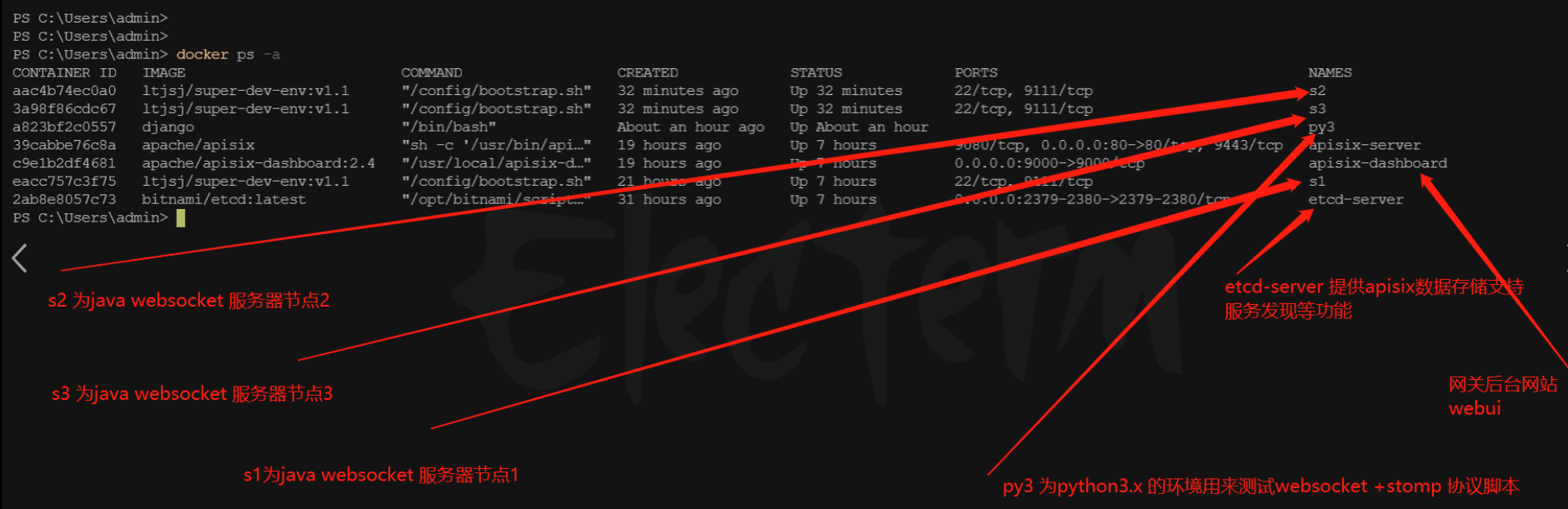
本为搭建环境,模拟集群环境,在我windows 电脑 采用docker 模拟
整体的环境说明:如下图
-
搭建环境
docker pull django -
运行python 容器